65B, Computer Village, Ikeja Along, Lagos State
Headless WordPress: How It Works, Benefits, Architecture, and When to Use It in 2026
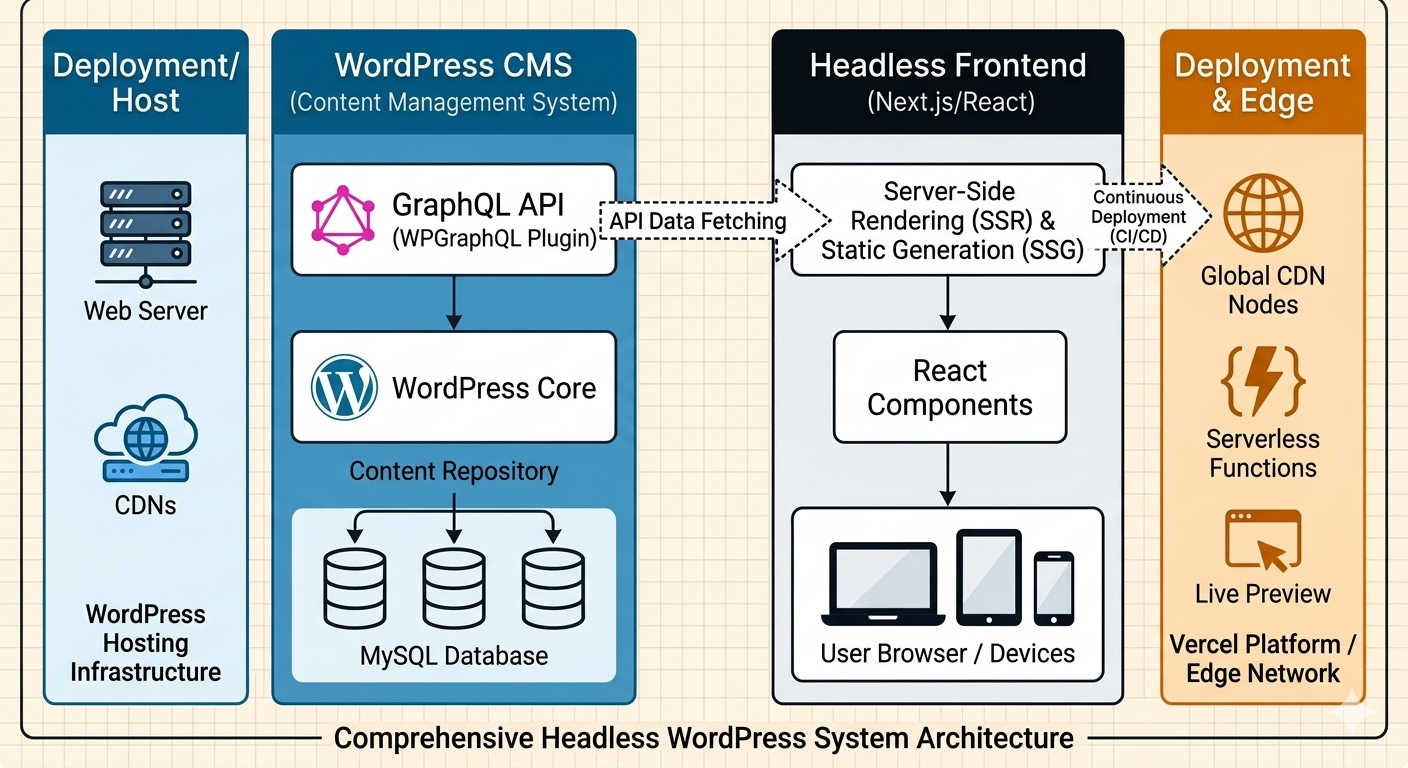
Modern websites are increasingly moving beyond traditional server-rendered pages. Headless WordPress separates the content management system from the frontend, allowing developers to manage content in WordPress while delivering that content through technologies such as React, Next.js, Vue, or other frontend frameworks.
This architecture can provide greater flexibility, performance, and control, but it also introduces additional development and maintenance requirements.
What Is Headless WordPress?
Traditional WordPress combines two major responsibilities: managing website content and displaying that content to visitors.
The WordPress administration area handles posts, pages, media, users, categories, plugins, and other content. The WordPress frontend then uses PHP themes to turn that information into HTML pages.
A headless setup separates these responsibilities.
WordPress remains the backend content management system, while another technology controls the public-facing website. Instead of relying on a conventional WordPress theme, developers can build the frontend with React, Next.js, Vue, Svelte, or another framework.
This creates a decoupled architecture where the CMS and presentation layer operate independently.
How the Architecture Works
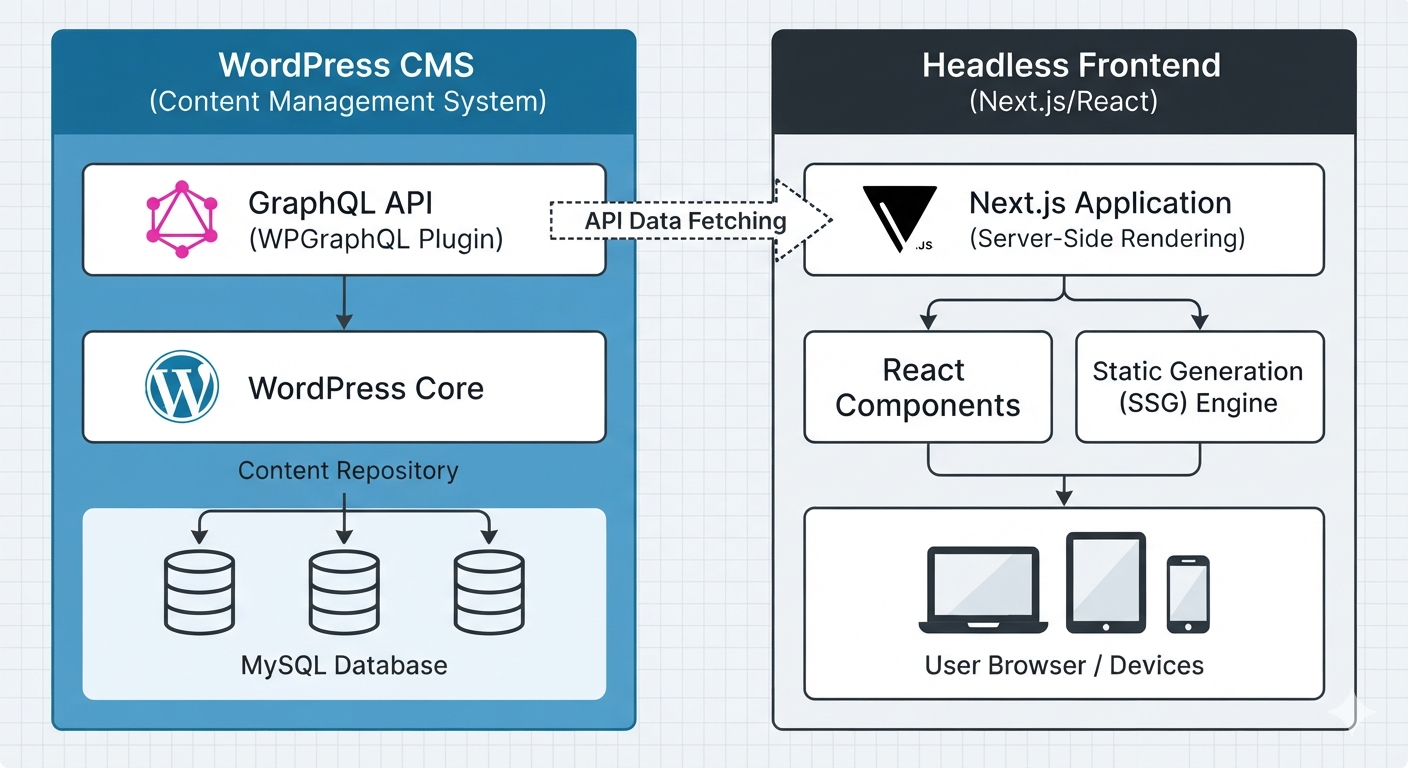
The basic architecture is relatively straightforward.
A content administrator logs into WordPress and creates a blog post, product, page, or other piece of content. WordPress stores that information in its database.
The frontend application then requests the required information through an API.
The API returns structured data, commonly in JSON format. The frontend application processes that data and renders the final interface for the visitor.
For example, a typical architecture might look like this:
Content Editor
↓
WordPress CMS
↓
REST API / GraphQL
↓
Next.js / React Application
↓
Visitor's Browser
This separation gives developers significantly more control over the presentation layer.
A company could therefore continue using WordPress for content management while building a highly customized frontend without being restricted by WordPress themes.
REST API and GraphQL
APIs are the bridge between the WordPress backend and the modern frontend.
WordPress includes a REST API that allows applications to retrieve and manipulate content programmatically.
For example, a frontend could request posts from an endpoint such as:
/wp-json/wp/v2/posts
The response contains structured information that JavaScript applications can consume.
Developers can learn more from the official WordPress REST API Handbook.
GraphQL is another option. With GraphQL, applications can request specific fields rather than receiving an entire predefined response.
This can be particularly useful for complex applications containing relationships between posts, authors, categories, custom fields, products, and other data.
Major Benefits of the Architecture
One of the biggest reasons developers consider this approach is frontend flexibility.
With a decoupled frontend, developers are free to use modern frameworks and development patterns without depending on a traditional WordPress theme.
Performance can also improve when the frontend uses technologies such as static generation, server-side rendering, caching, and content delivery networks.
Another advantage is scalability.
A heavily visited website can be designed so that the frontend and CMS are optimized independently. This can make it easier to introduce dedicated caching and deployment strategies.
There are also potential security benefits because the public-facing application does not necessarily expose the same WordPress presentation layer used by a conventional installation.
However, these benefits depend heavily on proper architecture and implementation.
Potential Disadvantages
A headless architecture is not automatically better.
The biggest disadvantage for many projects is increased complexity.
A traditional WordPress website can often be installed, configured, and managed from one environment. A headless project introduces additional components.
You may need:
- WordPress hosting
- Frontend hosting
- API configuration
- Authentication
- Deployment pipelines
- API caching
- Separate frontend development
- Additional monitoring
- More complicated content previews
The editorial experience can also require additional work.
For example, a marketing team may want to preview exactly how a newly published page will look before making it public. Implementing that experience in a decoupled environment requires deliberate development.
Costs can therefore increase when compared with a conventional WordPress website.
Security and Performance
Security should be considered at every layer.
WordPress itself still needs regular updates, secure authentication, appropriate permissions, reliable hosting, and carefully selected plugins.
The frontend application also needs its own security controls.
API endpoints should not expose sensitive information. Authentication tokens and private credentials should never be placed directly into client-side code.
Caching is equally important.
A frontend can cache API responses to reduce unnecessary requests to WordPress. Static generation can also reduce backend workload because pages may be generated before visitors request them.
A properly configured CDN can then distribute cached assets from locations closer to users.
When Should You Use It?
The right architecture depends on the project.
A headless approach can be particularly useful for:
- High-traffic publishing platforms
- Custom web applications
- Large content platforms
- Interactive marketing websites
- SaaS products using WordPress as a CMS
- Organizations with dedicated development teams
- Projects already using React or Next.js
- Websites requiring highly customized frontend experiences
It may be unnecessary for a simple business website.
If a company needs five pages, a contact form, basic SEO, and occasional blog posts, traditional WordPress may provide everything required with considerably less complexity.
The goal should not be to use newer technology simply because it is newer.
The goal is to choose the architecture that solves the actual business and technical requirements.
The frontend can retrieve posts through an API service and transform the returned data into reusable components.
For larger applications, developers should consider API caching, image optimization, error handling, loading states, content preview functionality, authentication requirements, and deployment automation from the beginning.
If you are building conventional WordPress projects as well, our WordPress Development Services can serve as a useful internal reference for the broader WordPress ecosystem.
Traditional vs Headless WordPress
The traditional approach is usually easier to manage.
WordPress controls both the administration area and frontend, themes provide presentation, and plugins can extend functionality.
The headless approach provides considerably more frontend freedom but requires more engineering.
| Feature | Traditional | Headless |
|---|---|---|
| WordPress CMS | Yes | Yes |
| WordPress themes | Usually | Optional/No |
| React/Next.js | Optional | Common |
| Development complexity | Lower | Higher |
| Frontend flexibility | Moderate | Very high |
| API dependency | Low | High |
| Maintenance | Simpler | More involved |
| Custom application potential | Moderate | Excellent |
- Benefits of using digital technology tools
- Survived not only five centuries



Leave a Comment